
You open ARC Raiders, press play, and wait for matchmaking to begin. Instead of loading into a match, the game stops and shows the message matchmaking has failed. This can feel annoying because ARC Raiders is built around online play. Without matchmaking, you cannot join missions, connect with other players, or even test basic gameplay. When this error appears again and again, it turns a simple gaming session into repeated retries and wasted time.
This article explains what the ARC Raiders matchmaking failed error means, where it appears, why it happens, how you can fix it step by step, and how to lower the chance of seeing it again later.
What Does “Matchmaking Has Failed” Mean in ARC Raiders?
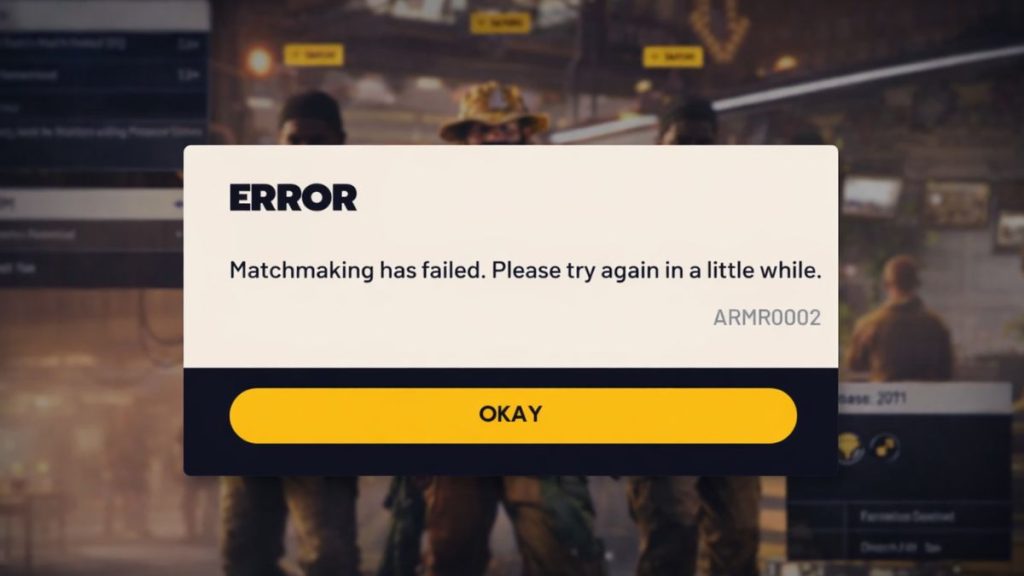
The matchmaking has failed error means the ARC Raiders game client cannot successfully connect you to an online session. When you press play, the matchmaking system checks server availability, player queues, region settings, and connection quality. If something in that process breaks, the system cancels matchmaking instead of forcing a weak or unstable connection. This protects the game session and prevents loading into broken matches managed by Embark Studios servers.
Players usually see this error on the main lobby screen right after starting matchmaking. Sometimes it appears after a short loading attempt. Other times it shows instantly with no progress bar at all. The message can appear on PC and other supported platforms, depending on server load and network conditions.
Common Causes of ARC Raiders Matchmaking Failed Error
This error can happen for several reasons, depending on server status, network setup, and local system settings. Below are the most common causes players experience.
- ARC Raiders servers are temporarily offline or under maintenance
- Internet connection instability, packet loss, or high latency
- Strict NAT type blocking multiplayer connections
- Firewall or router settings blocking game traffic
- VPN or proxy routing traffic through unsupported regions
- Low player availability in your selected region
- Outdated ARC Raiders game client
How to Fix ARC Raiders Matchmaking Has Failed Error?
The fixes below focus on removing these blocks one by one. After applying each fix, always try matchmaking again so you can see what actually resolves the problem.
Fix #1: Check ARC Raiders Server Status
Matchmaking will fail every time if ARC Raiders servers are offline or under maintenance. When servers are unavailable, the game cannot create or join online sessions, even if your internet connection works perfectly.
Here are the following steps which help you check server status.
- Open a web browser on your PC or phone
- Visit the official ARC Raiders website
- Check announcements from Embark Studios
- Look for maintenance or outage notices
- Check official ARC Raiders social media pages
- Wait until servers are confirmed online
If servers are down, wait before trying other fixes.
Fix #2: Restart the Game, Launcher, and Network
Temporary connection data can break matchmaking sessions and block new requests.
Follow the steps below to reset everything cleanly.
- Close ARC Raiders completely
- Exit the game launcher
- Restart your PC or console
- Turn off your router for 30 seconds
- Turn the router back on
- Launch the game and try matchmaking
Fix #3: Disable VPN or Proxy Services
VPNs and proxy services reroute traffic through different regions. This often prevents ARC Raiders from finding compatible servers or players.
Follow the steps below to easily disable VPN or proxy services.
- Close ARC Raiders
- Open your VPN or proxy app
- Disconnect from the active server
- Exit the VPN app completely
- Open Windows network settings
- Make sure no proxy is enabled
- Restart ARC Raiders and retry matchmaking
Direct connections work best for matchmaking.
Fix #4: Check NAT Type and Router Settings
A strict NAT type limits how your system communicates with game servers. ARC Raiders matchmaking works better with open or moderate NAT settings. Check NAT status in your router or platform network settings. Enable UPnP if available and avoid double NAT setups if possible.
Fix #5: Allow ARC Raiders Through Firewall
Firewalls can block the ports ARC Raiders uses for online connections. When traffic is blocked, matchmaking fails without a clear warning.
Follow these easy instructions to allow ARC Raiders through the firewall.
- Open Windows Security
- Go to Firewall and network protection
- Click Allow an app through firewall
- Select Change settings
- Find ARC Raiders in the list
- Allow private and public access
- Save changes and restart the game
This allows proper server communication.
Fix #6: Change DNS Settings
DNS issues can delay or block server address resolution. When ARC Raiders cannot resolve server addresses, matchmaking may fail instantly.
Here’s how you can change DNS settings safely.
- Open Windows Settings
- Go to Network and Internet
- Open Advanced network settings
- Click More network adapter options
- Right-click your active connection
- Open Properties and select Internet Protocol Version 4
- Set DNS to a public provider like Google or Cloudflare
- Save changes and restart your network
Fix #7: Update ARC Raiders Game Client
An outdated ARC Raiders game client may not match the current server version. When versions differ, matchmaking requests can fail.
Perform the following steps carefully to update the game.
- Open your game launcher
- Go to the game library
- Locate ARC Raiders
- Check for updates
- Download and install all available patches
- Restart the launcher
- Launch the game and try matchmaking
Fix #8: Reinstall ARC Raiders (Last Option)
If matchmaking continues to fail after all fixes, the game installation may be damaged. Corrupted files, broken updates, or failed patches can stop server communication even when the network is stable. A clean reinstall removes these hidden issues and resets the game environment fully.
Uninstall ARC Raiders completely, restart your system, then reinstall the game from the official source. Launch the game once before changing settings or running background apps.
Prevention Tips to Avoid Matchmaking Issues in ARC Raiders
Prevention reduces repeated errors and saves time during future sessions. These simple habits help keep matchmaking stable.
- Keep ARC Raiders updated at all times
- Avoid VPNs while playing
- Restart your router weekly
- Use an open or moderate NAT type
- Avoid heavy downloads during gameplay
- Close unnecessary background apps
- Play during off-peak server hours
Conclusion
Overall, the ARC Raiders matchmaking has failed error means the game cannot place you into an online session. This usually happens because of server downtime, network restrictions, or local configuration issues. While the error message feels blocking, most causes are temporary or fixable with basic steps.
Try each fix carefully and follow the prevention tips to lower future issues. If matchmaking still fails, contact Embark Studios support and share your platform and network details. If this article helped you, leave a comment and share it with other ARC Raiders players facing the same problem.