You launch Arc Raiders and instead of loading into the game, you see error code 30005. That can be frustrating, especially if you were ready to jump into a match. In most cases, this error is linked to Easy Anti-Cheat or a system permission issue. The good news is that it is usually fixable. This guide explains what error code 30005 means and shows you 8 working fixes step by step.
What Is Arc Raiders Error Code 30005?
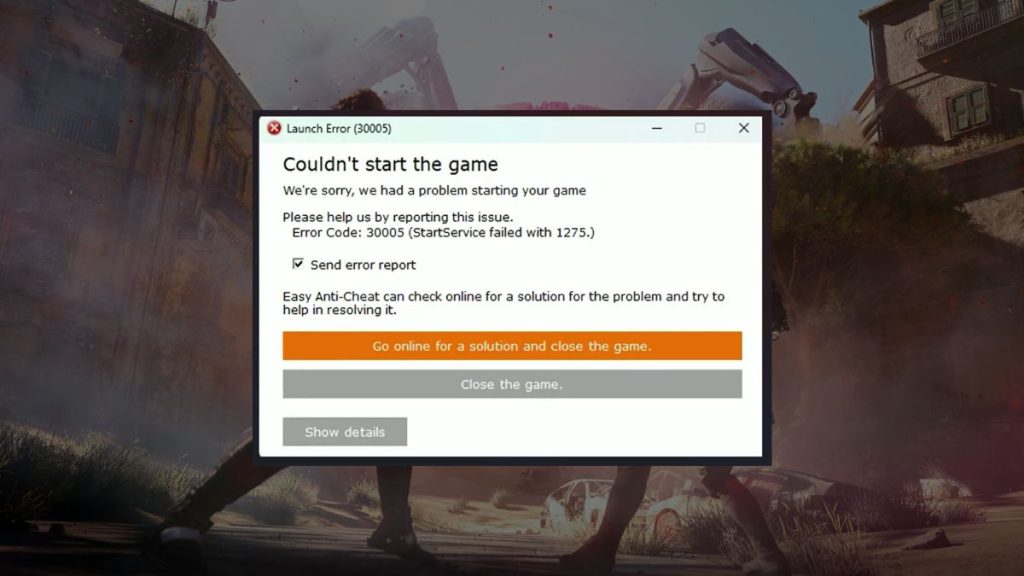
Arc Raiders error code 30005 usually appears during startup and is commonly connected to Easy Anti-Cheat. Arc Raiders, developed by Embark Studios, uses Easy Anti-Cheat to protect matches from cheating software. When the anti-cheat service fails to initialize properly, the game cannot launch. This may happen if the service is not running, if files are corrupted, or if Windows blocks access. It is important to understand that this error is not typically a ban. It is most often a system or anti-cheat loading issue.
Players usually see this message after clicking Play in Steam or Epic Games Launcher. The error appears before reaching the main menu.
Common Causes of Arc Raiders Error Code 30005
This error can happen due to anti-cheat conflicts, corrupted files, or system-level permission problems.
- Easy Anti-Cheat service not running properly
- Corrupted or missing Easy Anti-Cheat files
- Antivirus software blocking anti-cheat
- Windows Firewall restricting the game
- Damaged game files
- Outdated GPU drivers
- Missing Windows updates
- Background security programs interfering
How to Fix Arc Raiders Error Code 30005?
To resolve this issue efficiently, check both your anti-cheat service and system permissions. Most players fix this error without reinstalling the entire game.
Fix #1: Restart Your PC
Sometimes the anti-cheat service fails due to temporary system conflicts.
Follow these steps:
- Close Arc Raiders completely.
- Exit Steam or Epic Games Launcher.
- Restart your computer.
- Launch the game again after boot.
A fresh system start often resets background services.
Fix #2: Verify Game Files
Corrupted game files can trigger error code 30005.
You can perform the following steps:
- Open Steam or Epic Games Launcher.
- Go to your game library.
- Right-click Arc Raiders.
- Select Properties.
- Choose Verify integrity of game files.
- Wait for the scan to complete.
If files are damaged, the launcher will repair them automatically.
Fix #3: Repair Easy Anti-Cheat
Easy Anti-Cheat includes a repair option inside the game folder.
Follow the steps below:
- Open the Arc Raiders installation folder.
- Locate the Easy Anti-Cheat folder.
- Run the EasyAntiCheat setup file.
- Select Repair Service.
- Restart your PC after repair.
Repairing EAC often resolves service initialization errors.
Fix #4: Run the Game as Administrator
Windows permissions sometimes block anti-cheat services.
Here’s how you can grant admin access:
- Right-click Arc Raiders executable file.
- Select Properties.
- Go to Compatibility tab.
- Check Run as administrator.
- Apply changes.
Administrator access allows the service to start correctly.
Fix #5: Disable Antivirus Temporarily
Some antivirus programs mistakenly block Easy Anti-Cheat.
Try these simple steps:
- Open your antivirus software.
- Temporarily disable real-time protection.
- Launch Arc Raiders.
- If it works, add the game folder to exceptions.
- Re-enable antivirus protection.
Always keep protection active after testing.
Fix #6: Allow the Game Through Firewall
Windows Firewall can restrict game services.
Follow these steps carefully:
- Open Windows Security.
- Click Firewall and Network Protection.
- Select Allow an app through firewall.
- Add Arc Raiders and Easy Anti-Cheat.
- Save settings.
Firewall exceptions allow proper communication.
Fix #7: Update GPU Drivers
Outdated graphics drivers can cause startup conflicts.
Here are the following steps which help you update drivers:
- Visit NVIDIA or AMD official website.
- Download the latest driver for your GPU.
- Install the driver.
- Restart your PC.
- Launch the game again.
Updated drivers improve system compatibility.
Fix #8: Reinstall Easy Anti-Cheat
If repair does not work, reinstalling may fix corrupted files.
Follow the steps below:
- Navigate to the Easy Anti-Cheat folder.
- Run the setup file.
- Select Uninstall.
- Restart your PC.
- Run the setup again and select Install.
This refreshes the anti-cheat service completely.
Prevention Tips to Avoid Error Code 30005
Regular system maintenance reduces anti-cheat conflicts. Arc Raiders depends on Easy Anti-Cheat working properly, so keeping your system stable matters.
- Keep Windows 10 or Windows 11 updated
- Update GPU drivers regularly
- Avoid force-closing the game
- Do not modify anti-cheat files
- Add the game to antivirus exceptions
- Restart your PC after major updates
- Avoid running suspicious background software
Conclusion
Arc Raiders error code 30005 is usually linked to Easy Anti-Cheat failing to start properly. It is not typically a ban and does not mean your account is blocked. In most cases, verifying game files, repairing EAC, or adjusting system permissions fixes the issue quickly.
Work through the fixes step by step. If the problem continues, contact Embark Studios support or check official Arc Raiders forums for updates. If this guide helped, share it with other players who may be facing the same error.
Published on February 25, 2026 under .
