In the age of short-form content, where every second counts and speed is of the essence, Snapchat creators are continually seeking tools that let them upload high-quality videos without waiting for ages or sacrificing visual clarity. If you’re a content creator targeting fast uploads, minimal file sizes, and sharp video details, lightweight video compressors and exporters are your best friends. In this article, we dive into six of the most efficient and creator-favorite tools you can start using today.
TL;DR
If you’re tired of long upload times on Snapchat or dealing with grainy, compressed videos, there are several expert-recommended tools that can help. These six lightweight video compressors and exporters keep your content crisp and upload-ready without bloating your system. Whether you work on desktop or mobile, there’s a solution here for both casual and professional creators. Read on to find the best one for you!
1. HandBrake – The Open-Source Powerhouse
Best for: Desktop users who want full control over compression without paying a dime.
HandBrake has long been a favorite among content creators, not just because it’s free but because it’s powerful, fast, and surprisingly user-friendly after a short learning curve. Available on Windows, Mac, and Linux, HandBrake allows creators to fine-tune settings such as frame rate, resolution, and bitrate to significantly shrink video sizes while maintaining visual fidelity.
Main Highlights:
- Batch processing lets you compress multiple videos at once.
- Presets available for popular devices and platforms.
- Doesn’t hog system resources—ideal for lightweight setups.
For Snapchat creators, this means quick compression with good results, particularly for videos shot in 1080p or even 4K destined for mobile audiences.
Pro tip: Use the “Fast 1080p30” preset for balancing speed and quality for Snapchat uploads.
2. VLC Media Player – More Than Just a Player
Best for: Quick compressions without installing a dedicated video editor.
While most people consider VLC a simple media player, insiders know that its built-in video conversion tools can double as a light-duty compressor. It’s already on many systems, and with just a few clicks, you can use it to reduce file sizes quickly and easily.
Main Highlights:
- No need to install new software if you already have VLC.
- Supports nearly every video format imaginable.
- Simple bitrate and resolution customization settings.
If you’re in a pinch and want to compress a video fast before posting to Snapchat, VLC is a hidden gem worth trying out.
3. CapCut – Creator-Friendly and Feature-Rich
Best for: TikTok and Snapchat creators looking for a mobile-first, export-friendly solution.
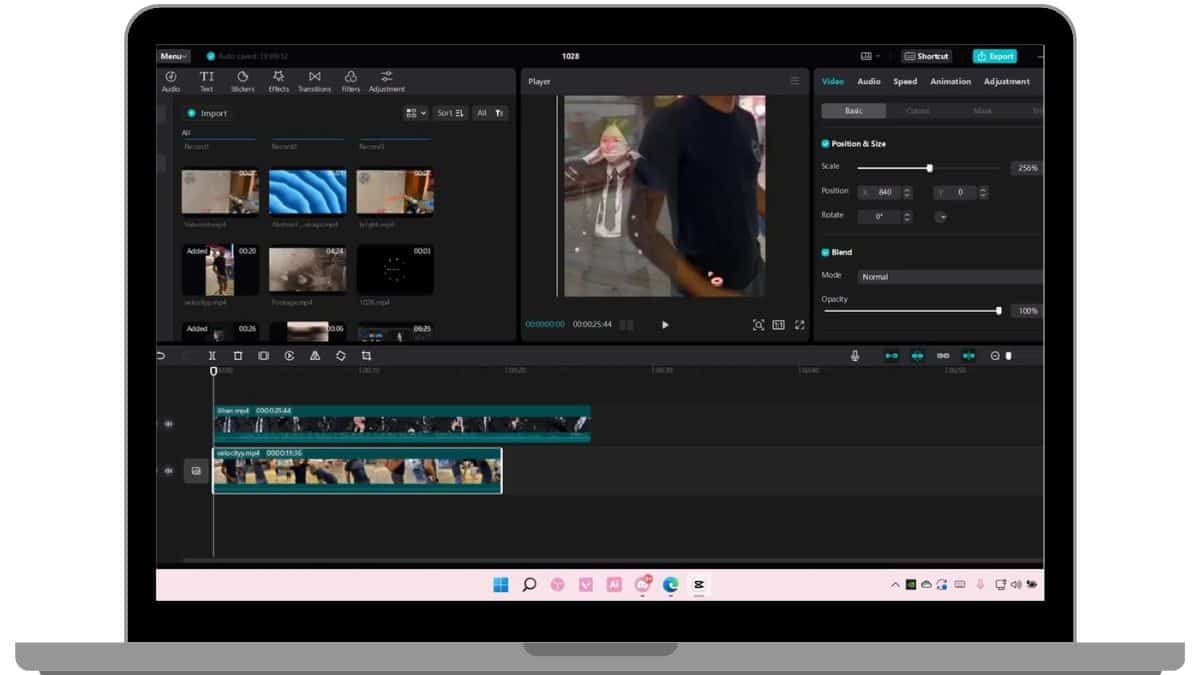
CapCut isn’t just a trendy name buzzing in content creator circles. Developed by ByteDance (the same team behind TikTok), CapCut is optimized for social media platforms, offering built-in tools to compress and export videos optimized for mobile and vertical viewing.
Main Highlights:
- Available on iOS, Android, and desktop.
- Auto-optimization for social platforms like Snapchat, TikTok, and Instagram.
- Includes editing features like transitions, overlays, and filters—all exportable in compressed formats.
Its export settings allow you to select resolution, FPS, and quality level, easily balancing quality against file size for speedy uploads.
4. Shutter Encoder – Hidden Gem for Professionals
Best for: Creators who want pro-level compression in a lightweight, free tool.
Though lesser-known, Shutter Encoder is a powerhouse for professionals needing excellent export options without bloated software environments. Built for Windows and Mac, it supports Apple’s ProRes, H.264, and H.265 codecs—perfect for retaining quality while slicing file sizes.
Main Highlights:
- Efficient encoding with advanced codec options.
- User-friendly interface despite its advanced capabilities.
- Trim, split, and color-correct footage before exporting.
Its balance of simplicity and high-end features makes it a go-to for those creating compelling, detailed short videos for Snapchat without overspending on software or hardware requirements.
5. Clideo – Online Compression with Zero Hassle
Best for: Quick compressions on the fly using any browser—no installation needed.
Clideo is a cloud-based tool that offers drag-and-drop simplicity for compressing videos. Perfect for creators who don’t want to mess with software or spend time learning settings, it automatically selects the best balance between quality and file size.
Main Highlights:
- Works on any device with a browser—desktops, tablets, phones.
- No signup required for small videos.
- Supports MP4, MOV, AVI, and more.
Clideo is especially useful if you’re working with raw camera files and need something quick and easy before uploading to Snapchat Stories or Spotlight.
6. Adobe Media Encoder – The Pro’s Compression Choice
Best for: Creators already using Adobe’s ecosystem who want top-tier compression control.
When you’re dealing with large batch edits or high-resolution footage, Adobe Media Encoder is often considered the gold standard. While not the lightest in terms of system demand, it allows ultra-fine control over compression standards, bitrates, and output formats.
Main Highlights:
- Integrated with Adobe Premiere Pro and After Effects.
- Presets for every use case—from mobile to cinema-grade exports.
- Excellent multi-thread performance for fast exporting.
If you’re producing high-end content or heavily edited stories for Snapchat, this might be the right investment, especially if you’re already paying for Adobe Creative Cloud.
Final Thoughts: Picking the Compressor That Works for You
Choosing the right video compressor and exporter depends on your specific workflow, the device you’re using, and how often you post. Here’s a quick guide to help you decide:
- Need pro-level exports? Adobe Media Encoder or Shutter Encoder are great choices.
- Casual or mobile user? CapCut or Clideo will handle your needs effortlessly.
- Prefer open-source and full control? Turn to HandBrake or VLC.
Remember, the goal is to maintain quality while reducing upload time—something all six of these tools excel at in their own way. Creators on Snapchat don’t need beefy machines or huge budgets to deliver snappy, high-impact videos. Just the right tool and a bit of optimization go a long way.
If you’re serious about making your content pop without the upload lag, try one or more of these lightweight video compressors and start posting like a pro today!
Published on December 17, 2025 under .
